Gen AI prompting has gone through quite an evolution over the past year.
- We started off with using flowery descriptive language based on fiction books – we figured, a large LANGUAGE model must like to read.
- Then JSON prompting and code-based prompt syntaxes came into play – we figured, let’s write like the machines.
- And in recent months, the dream of true natural language models has begun to come true, and with it, a plethora of techniques based on the ways an average human describes things. Super simple, minimalist prompts taking the lead.
But in the AI video space specifically, one thing that tools have consistently grappled with, is understanding film terminology.
It would seem like the easiest way to describe a shot, right? Use a well known film term like “over the shoulder” or “reverse shot” – but why doesn’t the AI get it, if these terms are so clear and so entrenched?
Short answer: Because they’re not.
For example, in the world of film, an “over the shoulder” means many things.
- the shoulder is on right side of frame
- the shoulder is on left side of frame
- the frame could contain part of a person’s face
- both shoulders are visible in the case of a “french over”
- the shoulder is a leg (Ssome directors will refer to ANYTHING dirtying frame off to one side as an “over the shoulder” including when the “shoulder” is someone’s leg, hand, etc.
- the shoulder is a wing or hunk of metal (non-human characters can have shoulders too – like chickens or robots)
- you get the idea
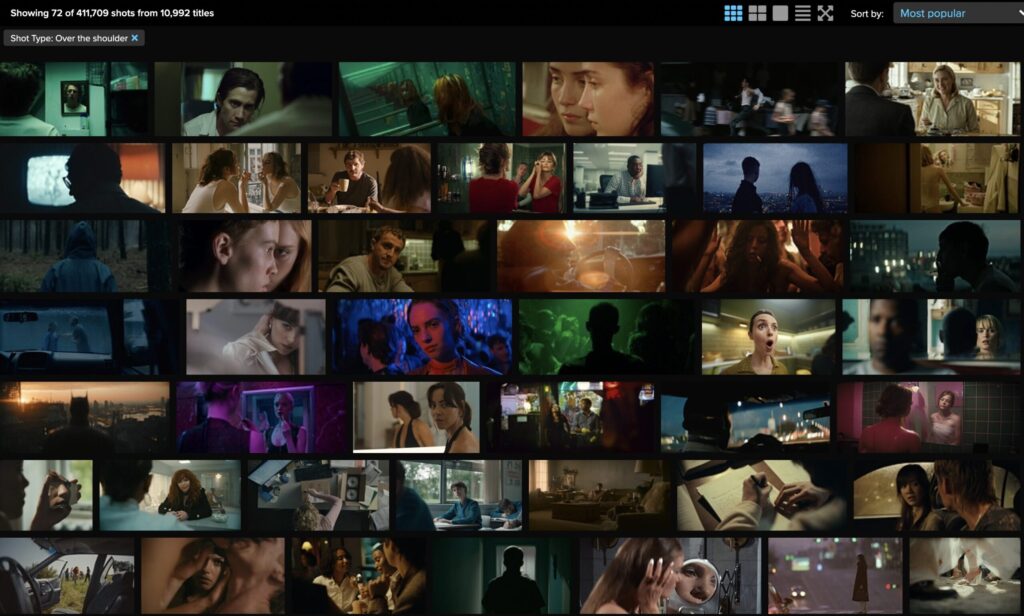
ABOVE: Mix of shots considered to be “over the shoulder”
As a film industry pro, it’s been fascinating to see that folks from tech backgrounds working with AI video, are now more knowledgeable about film terminology than the average filmmaker.
My specific background in filmmaking required that I know all film terms in depth, but to be completely honest – most filmmakers only know the most basic terms, and know them poorly. The average filmmaker working in the industry today doesn’t know the difference between a pan, a tilt, or a truck.
And when working with film crews, I often had to adapt or infer what shots people were talking about, either due to their lack of knowledge, or straight up different definitions of terms. Even the average film director has no idea what the proper terms are, even established, visionary directors.
Some filmmakers think a medium shot starts at the knees and ends at the top of the head, even though the true definition of a medium crops at the hip, and if it crops wider than that, it’s called a medium-wide. Some people refer to a thigh crop shot not as medium-wide, but as a “cowboy” simply because it crops just under the gun holster position, whereas others strictly refer to “cowboy” shots as low angle “over the shoulders” where the gun holster is in far foreground of frame.
Filmmaking as an industry is a weird marriage of military, art, and technicians, so our definitions for things are a lot more varied than people realize. Filmmaking is probably one of the most accessible industries (if you’re in a city with a film scene). Most filmmaking professionals did not go to film school, did not study film, and learned through apprenticeship, essentially.
When a film term fails to deliver an expected output, it’s often the training data at fault. Not your prompt.
(and as a side-note, this is also why storyboarding in films is still widely used today – because of how wonky the film terminology tends to be)
BUT ALL IS NOT LOST.
I’m going to share with you the fix, which is how filmmakers communicate about what a shot actually is, when film terms fail in real life. This strategy produces consistently good prompts and accurate outputs.
Describe Frames Spatially – XYZ Prompt Style
It’s easy as X, Y, and Z – space that is!
(Dad joke, sorry, not sorry)
As a Gen AI prompt creative – you are probably already familiar with these terms and have a general idea of how to think this way.
But I would bet you haven’t thought this through in real 3D space, the way that filmmakers do on set every day.
Because filmmakers don’t think in 2D – we think in 3D. We learn our craft with real cameras on real sets, walking around our subjects, walking through our environments. Interacting with props and costumes, moving lights in real spaces.
All of those lessons learned in the trenches informs the way that real filmmakers think about space and how to frame a shot.
And it’s vital, foundational experience that most prompters never get to have – and that’s the essential pitfall that many prompt creatives struggle with when it comes to getting the shots they want.
X space is horizontal plane
- right or left of frame
- right half of frame
- right third of frame
- etc
Y space is vertical plane
- upper right quadrant of frame
- lower third
- bottom edge of frame
- etc
Z space is depth
- far foreground
- foreground
- midground
- background
- far background
When film terms fail, we filmmakers will use clear, simple, location based directions to pinpoint what the director or cinematographer wants to see in frame.
These simple, directional / spatial terms leave little room for error, when directing human film crew, or Gen AI tools.
Here’s how I break down a frame in X – Y space:
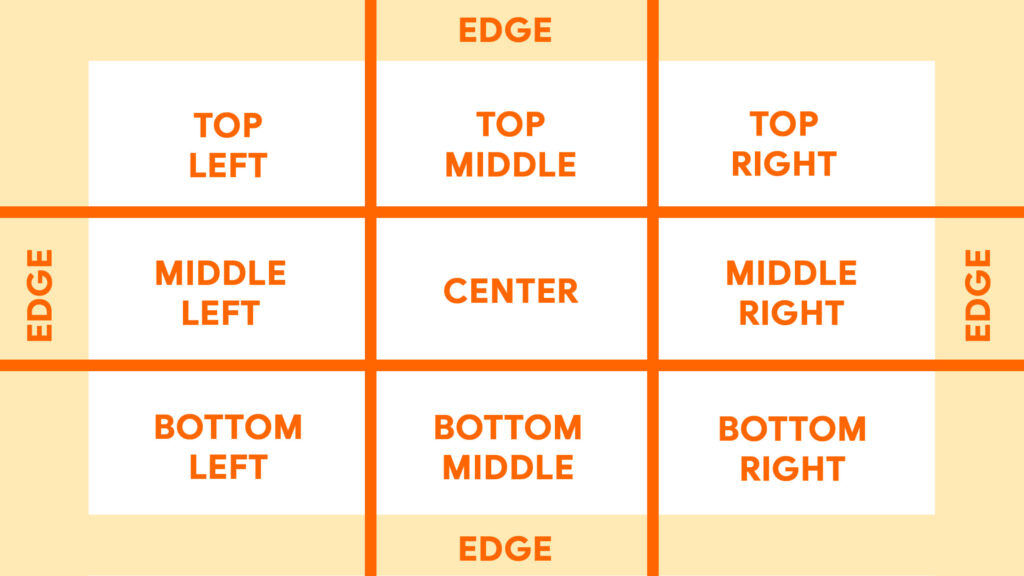
Typically a third is more equally divided, but I’ve noticed through trial and error that GenAI interprets the thirds more like how I’ve got it depicted in the reference image, with more bandwidth for corners and what it considers right and left sides of frame.
Not depicted is the dividing line for the half way marks, like if we were to say “top half” of frame, but that’s pretty straightforward.
Depth, as described before:
- far foreground
- foreground
- midground
- background
- far background
Now, the tricky thing about this is that, compared to X – Y space, Z space in the realm of film is context dependent.
It changes with focal length, environment, subjects, props, and more.
EXAMPLES:
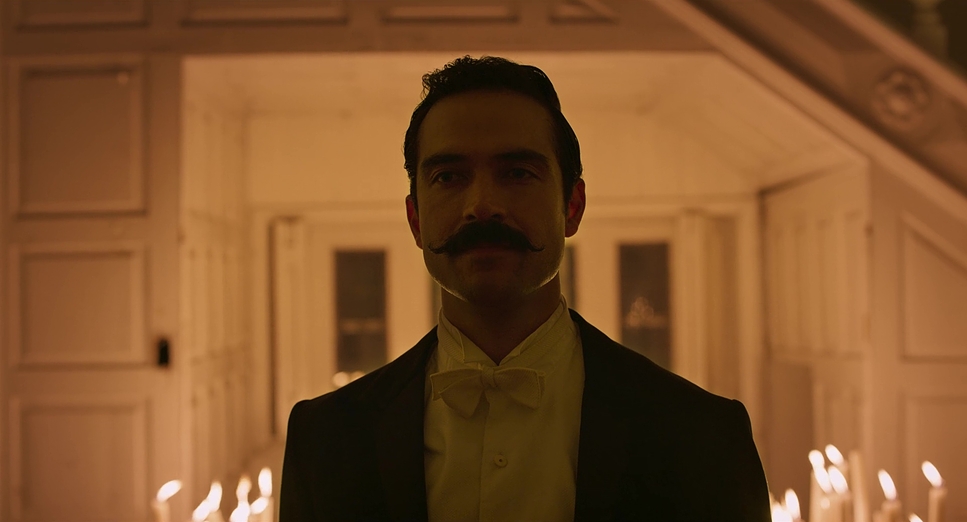
- Foreground: Man, center frame, looking slightly left of camera.
- Midground, out of focus: lit candles on bottom edge of frame.
- Background, out of focus: interior, mansion.
- Far background, out of focus: inside of front doors, mansion.
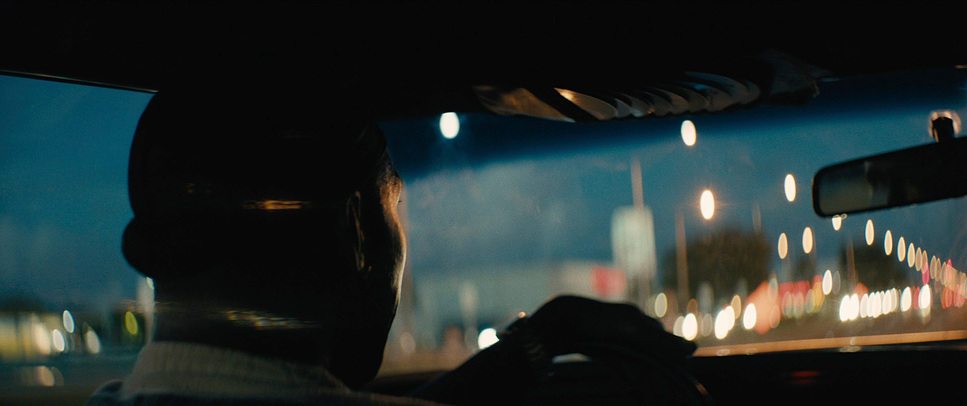
- Foreground: Back of man’s head, left half of frame.
- Midground, slightly out of focus: a hint of car interior, on top and bottom edges of frame.
- Far background, out of focus: night, street lights, bokeh.
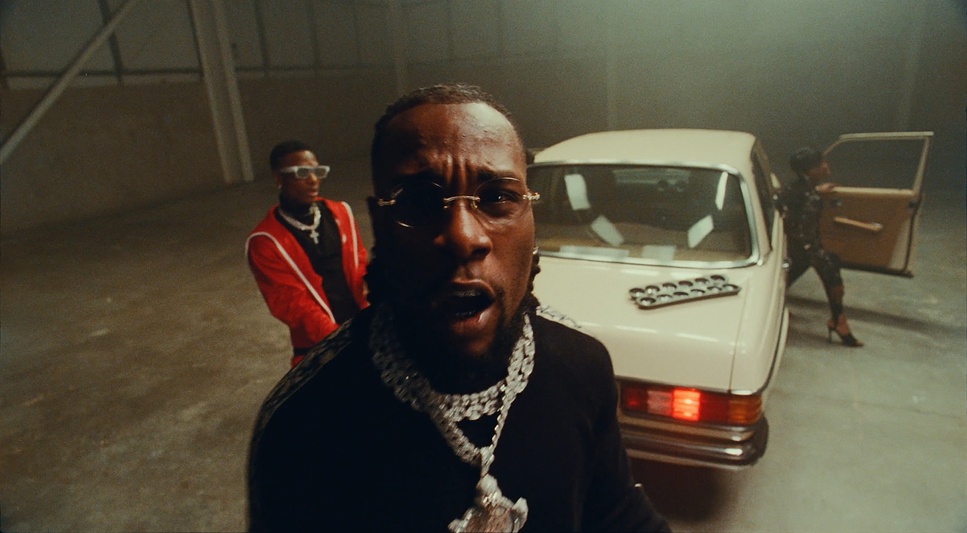
- Foreground: Man, center frame, speaking direct to camera.
- Midground: man, slight left of frame, with red shirt and white rimmed glasses, standing next to a white car, trunk visible, break lights.
- Background: woman in heels, right edge of frame, stepping out of passenger side of white car, passenger door open.
- Far background: interior, garage walls.
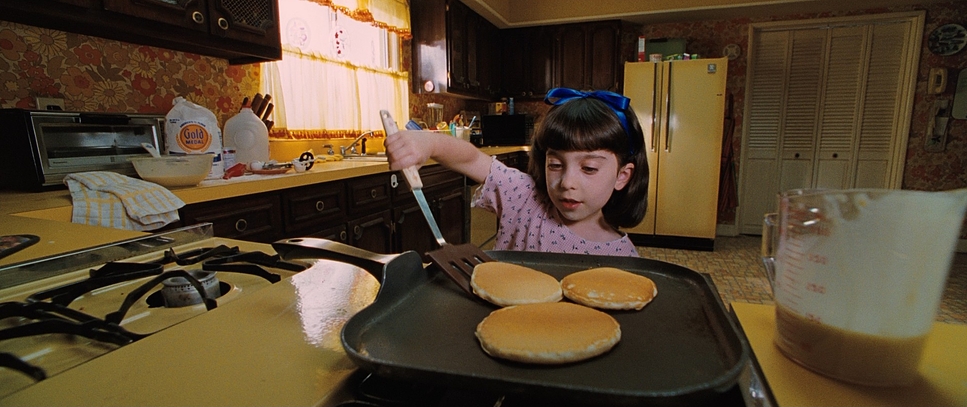
- Far Foreground, slightly out of focus: large plastic measuring cup of pancake batter, bottom right corner of frame
- Foreground: kitchen countertop, built in stove top, across bottom edge of frame. Skillet with 3 pancakes.
- Midground: Little girl, flipping pancakes. center frame.
- Background: kitchen interior, countertop on right half of frame, kitchen window, cabinets.
- Far background: kitchen back wall, fridge, center right of frame, pantry doors on right side of frame.
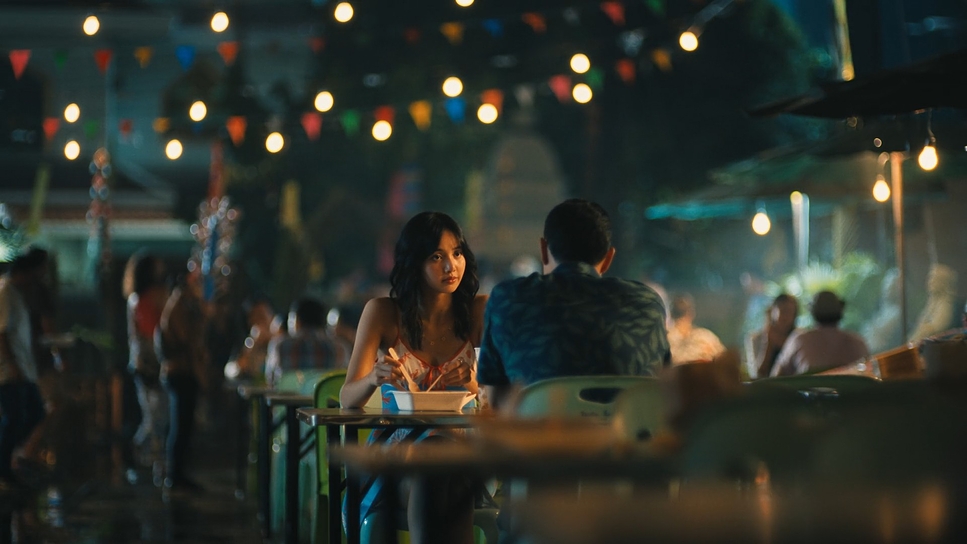
- Far Foreground out of focus: outdoor cafe chairs, tables, bottom right edge of frame.
- Midground: couple seated at cafe table, man’s back to camera, woman beyond him, face visible.
- Background, out of focus: other guests, backs visible, other cafe tables, chairs.
- Far background, out of focus: distant lights, night ambiance, festive outdoor summer event decor, guests enjoying, relaxed atmosphere.
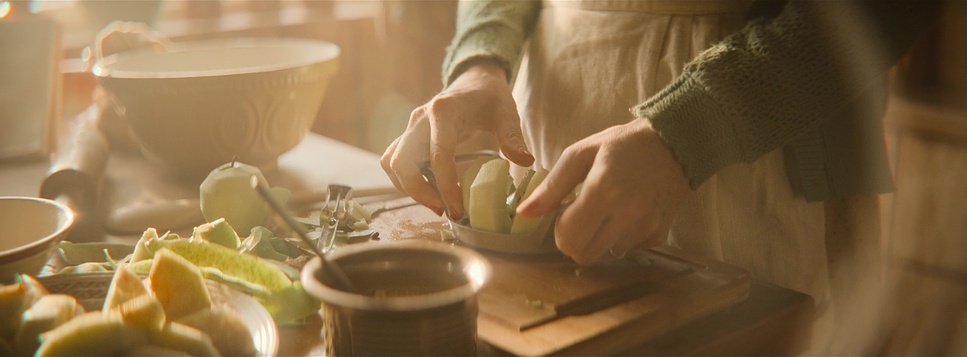
- Far Foreground, slightly out of focus: metal mixing bowl with spoon on bottom left edge, beside plate of cut potatoes(?), bottom left corner.
- Foreground: kitchen island, cutting board, cooking utensils. hands cutting food.
- Midground: woman’s arms, apron.
- Background, out of focus: kitchen interior.
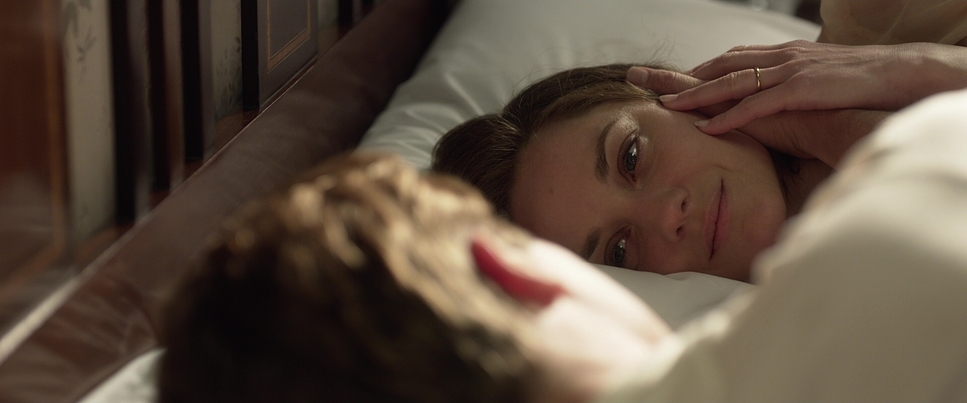
- Far Foreground, out of focus: back of man’s head / back of man’s shoulder.
- Midground: woman’s face, hand held to cheek.
- Background: bed pillow, hint of bed.
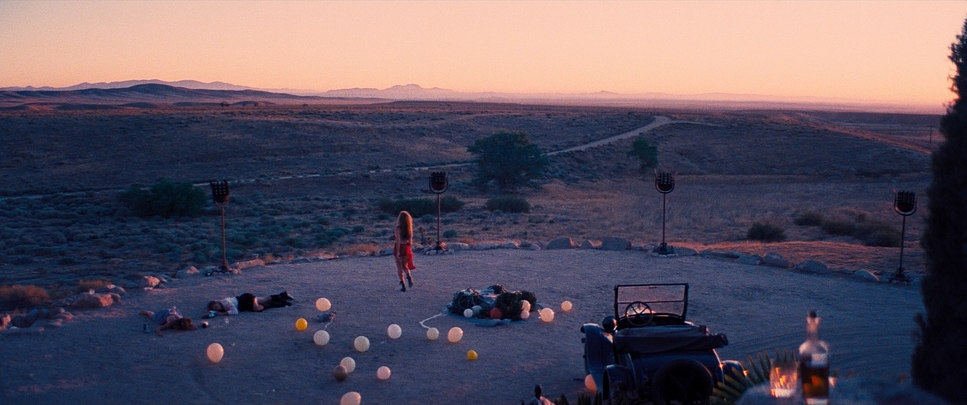
- Far Foreground, slightly out of focus: a table with whiskey and a glass, bottom right corner.
- Foreground: golf cart (?) bottom right edge of frame.
- Midground: balloons strewn about a plaza. Woman in red dress walking away.
- Background: a vast desert landscape with low shrubs.
- Far Background: distant mountains and a clear, ominous sky on top third of frame.
NOTE: these are not finished prompts – but this demonstrates the framework of how I think about depth when prompting, and how filmmakers would talk about the depth in frames like these. As you can see, even close ups have foregrounds, midgrounds, and backgrounds – it isn’t only wide shots.
And as you can also see, not every layer of depth must be accounted for if it isn’t important to illustrating the frame.
Sample Prompts
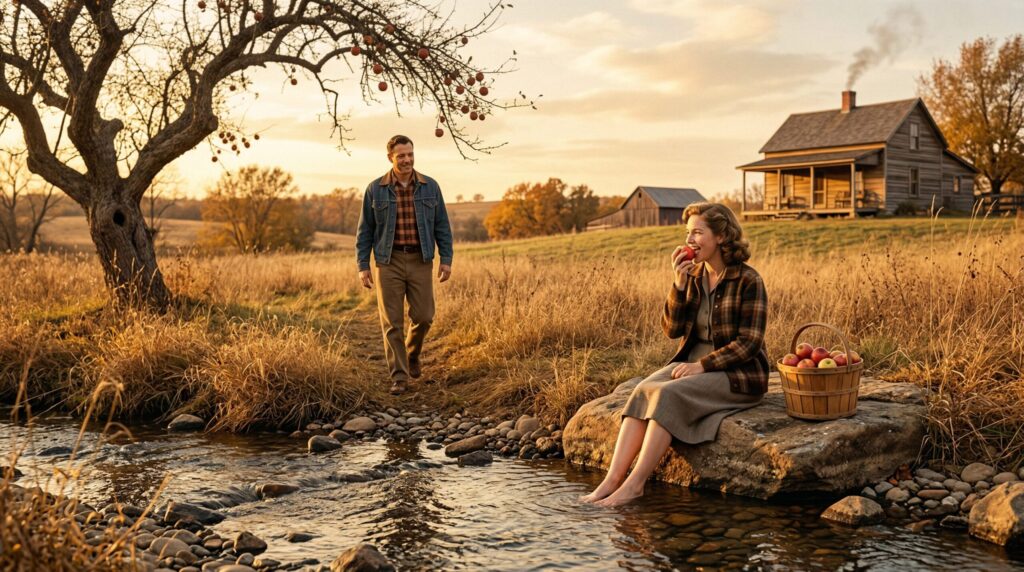
- In the background, on the top right of frame is a farmhouse with smoke serenely floating out of the chimney.
- In the bottom edge of frame in the foreground, there is a clear water creak running horizontally from left to right of frame. Some rocks visible in the creek, and a simple rocky shore.
- On the middle left of frame, in the midground, there is a man walking through the tall dry grass toward the woman. He has a warm, familiar expression, with a casual gait.
- On the middle right side of frame, in the foreground, there is a woman sitting on a rock beside the creek. She bites into a fresh apple, with a content and relaxed expression, with her feet dipped in the fresh cool creak water. Beside her on the dry shore is a basket full of ripe apples.
- On the left edge of frame, in the midground, is an old, ancient apple tree, its tall branches and ripe apples visible in the top left corner of frame.
- Location: rural, homestead, vintage farm, 1950’s Kansas, late autumn.
- Lighting: warm, golden hour lighting. Light glistens off the creak water.
- Color Balance: warm.

- close up of the woman’s face smiling to her husband.
- back of husband’s head on right side of frame, far foreground.
- in far background a hint of the window and curtain, and a hint of the plant are visible.
- woman has glasses, gentle smile
Hope this method helps! After you get the hang of it, this approach can help you prompt efficiently and accurately.
When using this approach, I get perfect Gen AI image outputs on the first try with single batch iterations, most of the time.
Questions? Reach out! fleshsyntax.ai[@]gmail.com